A MERN stack ecommerce site rarely fails at the React components. It fails in the data: a cart that trusts a price the browser sent, an order that points at a product someone edited last week, two customers buying the last unit at the same second, and a payment marked paid because a redirect said so. Get the MongoDB schema, the cart, the stock reservation and the payment webhook right, and the rest of the stack is ordinary work.
Most MERN ecommerce tutorials build a product grid, a cart held in Redux and a checkout button that calls Stripe, and stop there. That is a fine way to learn the stack and a poor way to run a shop. The gaps only show up with real traffic and real money: a price change mid-session, a refund, a flash sale, a webhook that arrives before the browser does.
This guide walks through the parts that hold up in production: how to model products and variants in MongoDB, where the cart should live, why orders must copy data rather than reference it, how to stop overselling, and how the checkout and payment flow should be wired between React, Express and Stripe. It ends with a build order for a MERN ecommerce store built from scratch. Code is kept short and illustrative. The decisions matter more than the syntax.
What a MERN ecommerce store needs before the first screen
Before any schema, write down which of these the store actually has, because each one changes the data model:
- Variants. Does a product come in sizes, colours or pack sizes with their own price and stock? If yes, stock and price belong to the variant, not the product.
- One seller or many. A single-brand store takes payment directly. A marketplace has to split money between vendors, which changes the payment design completely.
- Guest checkout. If people can buy without an account, carts exist before users do, and you need a way to merge them later.
- Stock that runs out. Print-on-demand and digital goods can skip reservations. Physical stock with small quantities cannot.
- Tax and shipping rules. A flat domestic rate is a field. Multiple regions with different tax treatment is a module.
- Who edits the catalogue. An admin panel for a non-technical team is a large share of the build and the part most often left out of estimates.
There is also an earlier question: whether to build custom at all. A catalogue of a few hundred products with standard checkout is usually cheaper on a hosted platform. Custom MERN makes sense when the buying flow is unusual (configurators, subscriptions with odd rules, B2B price lists, marketplace payouts) or when the store is one part of a larger product. The ecommerce app development cost guide covers that decision and the price ranges in detail.
The MongoDB schema for ecommerce: products, variants and prices
MongoDB lets you embed or reference. The rule that works for ecommerce is simple: embed what is always read together and changes together, reference what has its own lifecycle or is shared.
| Data | Embed or reference | Why |
|---|---|---|
| Product attributes, images, description | Embed in product | Always read with the product, edited with it |
| Variants (size, colour) with SKU, price, stock | Separate collection, referenced | Stock changes per variant on every order; you want atomic updates on a small document |
| Categories | Reference by id, denormalise the name and slug | Shared across products, renamed rarely |
| Reviews | Separate collection | Unbounded growth; embedding them bloats every product read |
| Cart line items | Embed in cart | A cart is read and written as one unit |
| Order line items | Embed in order, as copies | An order must not change when the product does |
Put variants in their own collection
It is tempting to embed variants as an array inside the product. That works until two orders for different sizes of the same shirt try to decrement stock at once, both rewriting the same product document. Keeping each variant as its own document, with its own stock field, lets you decrement one SKU atomically without touching anything else.
// products
{ _id, slug: "linen-shirt", title: "Linen shirt", categoryIds: [...],
  attributes: { material: "linen" }, images: [...], status: "active" }

// variants
{ _id, productId, sku: "LS-BLU-M", options: { colour: "blue", size: "M" },
  priceMinor: 249900, currency: "INR", stock: 14, reserved: 0 }
Store money as integers
Never store prices as JavaScript floating point numbers. Store them in the smallest currency unit as integers (priceMinor: 249900 for 2,499.00), which is also the format Stripe expects. If you need decimal arithmetic for tax, do it in integer minor units and round once, at a defined point, with a rule you can explain to an accountant. MongoDB's Decimal128 type is an option, but integers are simpler to move through JSON and React without surprises.
Indexes you will need on day one
- A unique index on
products.slugand onvariants.sku. variants.productId, because every product page loads its variants.- A compound index matching your category listing query, for example
{ categoryIds: 1, status: 1, createdAt: -1 }. - A text or search index only once you know how people search. For a real product search, a dedicated search index usually beats MongoDB's basic text index.
Shopping cart schema design: where the cart should live
The most common MERN tutorial cart lives in Redux or localStorage and is sent to the server at checkout. That design has three problems: the cart vanishes when the user switches device, the server has no idea what is in carts until the last moment, and the price in the browser can be edited.
Keep the cart on the server, in its own collection, and treat the React state as a view of it.
// carts
{ _id, userId: null, guestToken: "c9f1...", currency: "INR",
  items: [ { variantId, qty: 2, addedPriceMinor: 249900 } ],
  updatedAt: ISODate(...), expiresAt: ISODate(...) }
Guest carts and merging on login
A guest gets a random token in an httpOnly cookie, and the cart is keyed by it. When the guest logs in, merge the guest cart into the user's existing cart: sum quantities for the same variant, cap them at available stock, then delete the guest cart. Decide the merge rule once and write it down, because product and support will both ask.
Expire abandoned carts with a TTL index
Carts pile up. A TTL index on expiresAt lets MongoDB delete them for you. Push expiresAt forward on every cart write, so an active cart never expires. If marketing wants abandoned-cart emails, send them before expiry, not after.
Price snapshot or live price
Store the price at the time the item was added (addedPriceMinor), but never charge it. At checkout, re-read every variant's current price and stock on the server. If anything changed, show the customer the new total before taking payment. The snapshot exists so you can tell them what changed, not so you can bill from it.
Orders are snapshots, not references
An order is a legal and accounting record. If it references a product by id and someone later renames the product, changes its price or deletes it, your historical orders silently change or break. Copy what was sold into the order:
// orders
{ _id, orderNumber: "SC-10482", userId, email,
  items: [ { variantId, sku: "LS-BLU-M", title: "Linen shirt, blue, M",
             unitPriceMinor: 249900, qty: 2, taxMinor: 44982 } ],
  subtotalMinor, shippingMinor, taxMinor, totalMinor, currency: "INR",
  shippingAddress: {...}, status: "pending_payment",
  payment: { provider: "stripe", intentId: "pi_...", status: "requires_payment" },
  history: [ { status: "pending_payment", at: ISODate(...) } ] }
Keep the variantId for reporting and restocking, but render invoices and order history from the copied fields.
Model order status as a state machine
Order status is where ecommerce code rots fastest, because every new feature adds a status and a few if statements. Define the allowed transitions once and reject anything else on the server.
| From | Allowed next states | Triggered by |
|---|---|---|
| pending_payment | paid, payment_failed, cancelled | Payment webhook, or expiry job |
| paid | fulfilling, refunded | Warehouse or admin action, refund webhook |
| fulfilling | shipped, refunded | Shipping label created |
| shipped | delivered, returned | Courier update or admin |
| payment_failed, cancelled | none | Terminal; stock released |
Append every transition to history with a timestamp and the actor. When a customer disputes a charge months later, that array is the whole investigation.
Reserving stock without overselling
Two customers, one unit left, both press pay. If your code reads stock, checks it in JavaScript, then writes the new number, both requests can pass the check. The fix is to make the check and the write one atomic operation in MongoDB:
const res = await Variant.updateOne(
  { _id: variantId, $expr: { $gte: [ { $subtract: ["$stock", "$reserved"] }, qty ] } },
  { $inc: { reserved: qty } }
);
if (res.modifiedCount === 0) throw new OutOfStockError(variantId);
The filter only matches if enough unreserved stock exists, and the increment happens in the same operation. If nothing was modified, someone else got there first.
Reserve at checkout, commit on payment
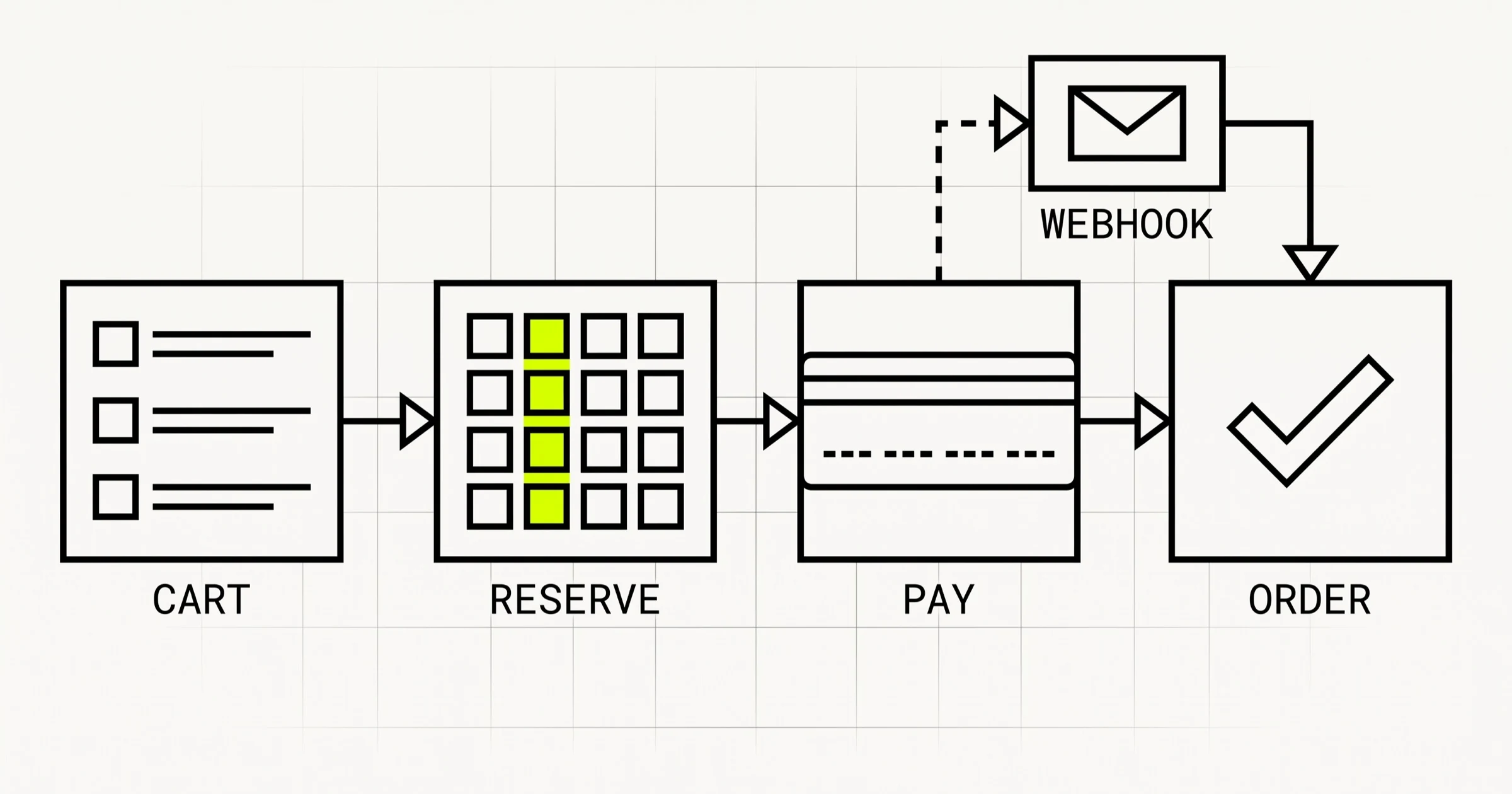
Reserve stock when the customer starts payment, not when they add to cart. Reserving at add-to-cart lets a few idle carts make your best seller look sold out. The sequence that holds up:
- Customer presses "Pay". The server re-prices the cart, creates an order in
pending_payment, and reserves stock for every line. - If any reservation fails, release the ones that succeeded and tell the customer which item ran out.
- On a successful payment webhook, convert the reservation: decrement
stockandreservedtogether. - On failure, cancellation or expiry, release the reservation.
- A scheduled job cancels orders stuck in
pending_paymentpast a time limit and releases their stock.
Transactions, and when you need them
Creating an order and reserving stock across several variants touches multiple documents. MongoDB supports multi-document transactions on replica sets, which includes every MongoDB Atlas cluster. Use one for the "create order plus reserve all lines" step so a half-reserved order can never exist. Keep the transaction short: no calls to Stripe or email inside it. Local development on a standalone mongod will reject transactions, so run a single-node replica set locally or use Atlas from the start.
The checkout and payment flow with Stripe
The single most important rule: the browser never decides the amount, and the browser never decides that an order is paid. Everything else follows from those two sentences.
Create the payment on the server, from server totals
The React checkout sends the cart id and the shipping choice. Express loads the cart, re-prices every line from the database, calculates shipping and tax, creates the order, reserves stock, and only then creates a Stripe PaymentIntent (or a Checkout Session) for totalMinor. The client receives a client secret, never a price it could change. Pass an idempotency key derived from the order id, so a double-click or a retried request cannot create two charges.
The webhook is the source of truth
After payment, Stripe redirects the customer back to your site. Do not mark the order paid on that redirect. Customers close tabs, lose connection and hit back. Mark it paid when your webhook endpoint receives the payment success event. In Express, that means:
- Mount the webhook route with a raw body parser (
express.raw) before the JSON parser, because signature verification needs the exact bytes Stripe sent. - Verify the signature with the endpoint secret, and reject anything that fails.
- Make the handler idempotent. Stripe can deliver the same event more than once, so store processed event ids and skip repeats.
- Look up the order by the PaymentIntent id stored on it, check the amount matches, then run the state transition and convert the stock reservation.
- Return a 2xx quickly and push emails and fulfilment into a queue or background job.
The success page can then poll your API for the order status. It will usually show "paid" almost immediately, and when it does not, it shows "confirming your payment" instead of a false success.
Refunds flow backwards through the same path
Issue refunds from the admin panel through the Stripe API, then let the refund webhook move the order to refunded and restock the items if they came back. Do not update your database first and hope the API call succeeds.
If you have many sellers, the design changes
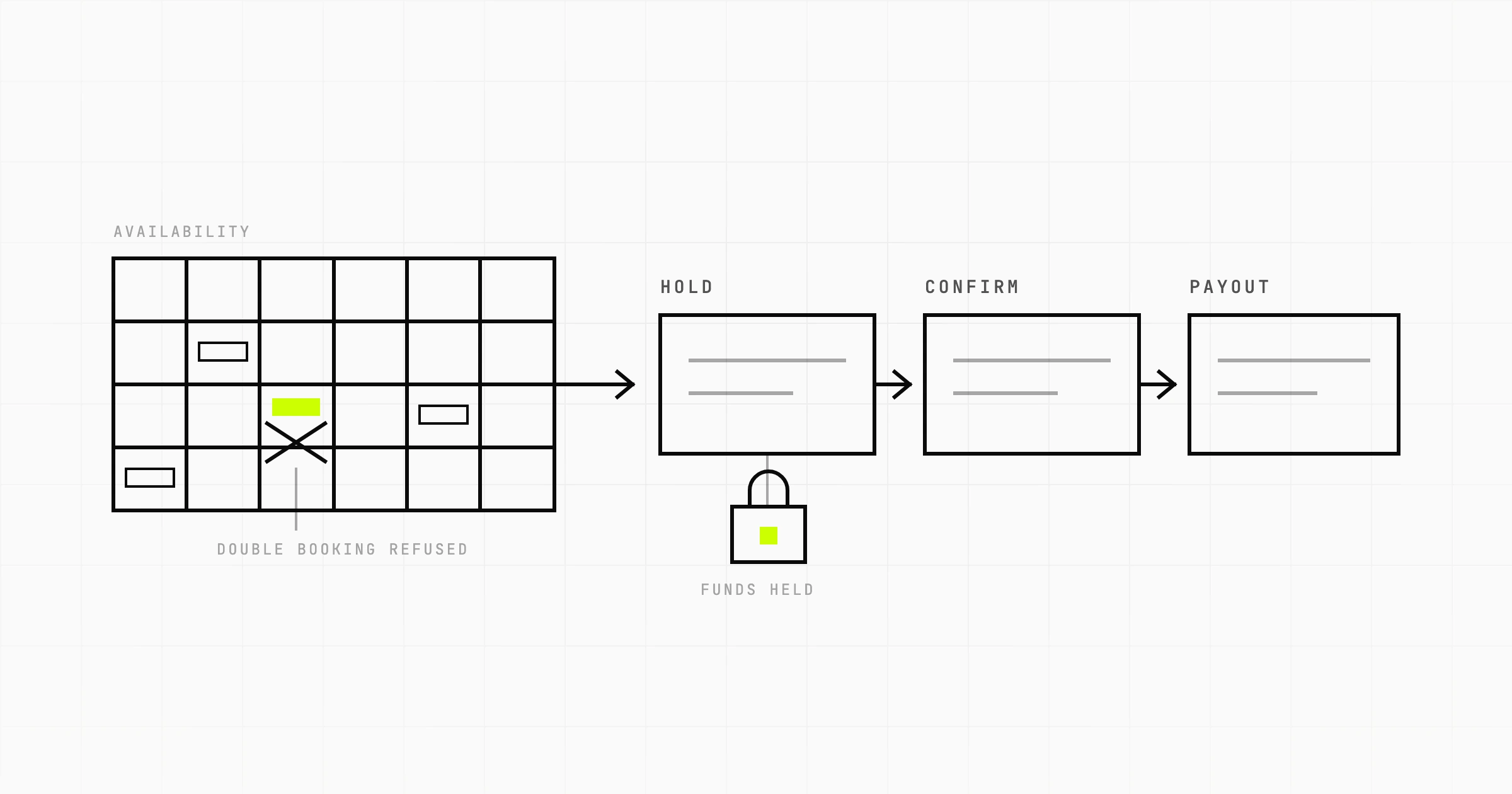
A multi-vendor MERN ecommerce platform cannot simply take the money into one account and pay vendors by hand. Stripe Connect handles the split, and the charge type you choose shapes your order model. On Nestlet, the lease marketplace we built in-house, we use separate charges and transfers: funds are held on the platform balance and released to the host only once the contract is finalised. The Stripe Connect split payments guide walks through charge types, account types and the webhooks that keep a marketplace ledger honest.
React and Express: what goes where in a MERN ecommerce app
The stack's letters do not tell you where logic belongs. This split keeps the shop correct and the front end simple.
| Concern | Lives in | Note |
|---|---|---|
| Prices, tax, shipping, totals | Express | Client may display an estimate, server decides |
| Stock checks and reservations | Express plus MongoDB | Atomic updates only |
| Cart contents | MongoDB, cached in React | Server state library (React Query or RTK Query) rather than hand-rolled Redux |
| Order status changes | Express, webhooks | State machine enforced server-side |
| Product pages for search engines | Server rendered | See below |
| Filters, UI state, drawer open or closed | React | Keep out of global state if one component owns it |
A plain React SPA is a weak storefront for search
Product and category pages are how an ecommerce store gets found. A create-react-app style single-page app sends an almost empty HTML document and builds the page in JavaScript. Google can render JavaScript, but rendering is deferred and less reliable, and other crawlers and link previews often see nothing. For a storefront, render product and category pages on the server. In practice most teams keep MongoDB and Express and swap plain React for Next.js on the front end, which still counts as MERN in every way that matters. The JavaScript SEO guide explains what crawlers see and how to check it.
API shape
Keep the public API boring and resource shaped: GET /products, GET /products/:slug, POST /cart/items, PATCH /cart/items/:variantId, POST /checkout, GET /orders/:orderNumber, POST /webhooks/stripe. Validate every request body with a schema library at the route boundary. Put admin routes under their own prefix with role checks, and rate limit login, checkout and anything that sends email.
Security basics that ecommerce makes non-negotiable
- Card data never touches your server. Use Stripe's hosted fields or hosted checkout so your PCI scope stays small.
- Store sessions or tokens in httpOnly cookies, not
localStorage. - Never return another customer's order: every order lookup filters by the authenticated user or a signed guest token.
- Log admin actions on prices, stock and refunds with who did it and when.
Deploying and running it
A MERN store has a build-time front end, a runtime API, a database and a webhook endpoint that must never be down during a sale. A few things are specific to ecommerce:
- Separate Stripe keys and webhook secrets per environment, and a staging environment that receives real test-mode webhooks, so payment code is exercised before production.
- Back up and test restores of the orders collection. Products can be re-imported. Orders cannot.
- Run the reservation expiry job with monitoring. If it silently stops, stock drains into abandoned reservations and the store shows items as sold out.
- Alert on webhook failures. Stripe shows failed deliveries in its dashboard, but you want to know before a customer emails.
The pipeline itself, from environment config to zero-downtime Node deploys and MongoDB migrations, is covered in DevOps for the MERN stack.
Building a MERN ecommerce site from scratch: a sensible order
Order matters more than speed. Build the parts that are hard to change first, and the parts that are easy to change once the hard parts are settled.
| Step | Build | Done when |
|---|---|---|
| 1 | Schema for products, variants, categories; seed data; indexes | A product page query and a category listing query both use indexes |
| 2 | Server-side cart with guest token, merge on login, TTL expiry | A cart survives a device switch after login |
| 3 | Checkout endpoint: re-price, create order, reserve stock in a transaction | Two concurrent buyers for the last unit: exactly one succeeds |
| 4 | Stripe payment, webhook handler, idempotency, expiry job | Order becomes paid with the browser tab closed |
| 5 | Server-rendered product and category pages | Page source contains the product title, price and description |
| 6 | Admin: catalogue, stock, orders, refunds | A non-developer can add a product and refund an order |
| 7 | Emails, shipping integration, analytics | Customer gets confirmation and tracking without manual steps |
| 8 | Search, promotions, reviews | Only after the steps above are in production |
Promotions deserve a warning. Discount codes look small and touch pricing, tax, refunds and reporting. Scope them as their own piece of work, with rules for stacking, minimum order values and what happens to a discount on a partial refund.
For a sense of the investment, a store at steps 1 to 7 is a real product build, not a template. Our published rate is about $20 an hour for a senior offshore team, and the kinds of stores and integrations we take on are listed on the ecommerce app development page. The cheapest way to find out what your version costs is to decide steps 1 to 4 on paper before any code is written.
Planning a MERN ecommerce build and unsure where the schema, stock and payment edges are? A Scoping Sprint ($2,300, two weeks) ends with the data model and checkout flow made for your catalogue, a prototype, and a fixed quote. Or just start a conversation.