Introduction to Last-Mile Delivery Route Optimization
Last-mile delivery represents one of the most complex and costly challenges in modern logistics. It refers to the final leg of the delivery process, where packages move from distribution centers to the end customer's doorstep. This stage accounts for approximately 50% of total shipping costs and presents numerous operational hurdles that businesses must overcome to remain competitive in today's fast-paced e-commerce landscape.
The complexity of last-mile delivery stems from multiple factors: unpredictable traffic patterns, time windows, vehicle capacities, driver schedules, and ever-increasing customer expectations for same-day or next-day deliveries. Traditional manual route planning simply cannot keep pace with these dynamic variables, leading to inefficient routes, delayed deliveries, and ballooning operational costs.
This is the kind of system we build under logistics software development: tracking, routing, ops consoles and integrations.
This comprehensive guide explores how to leverage Python, Google OR-Tools, and real-time traffic APIs to build powerful route optimization solutions that transform last-mile delivery operations. Whether you're a logistics manager, software developer, or technology enthusiast, this article provides the foundational knowledge and practical code examples needed to implement enterprise-grade route optimization.
Understanding the Last-Mile Delivery Challenge
The last-mile delivery problem has intensified dramatically with the explosive growth of e-commerce. Consumers now expect rapid, flexible, and transparent delivery options, putting immense pressure on logistics companies to optimize every aspect of their operations.
Several key challenges make last-mile delivery particularly difficult to solve. First, route complexity grows exponentially with the number of delivery stops—what's manageable with 10 stops becomes computationally intensive with 100 or 1,000 stops. Second, real-world constraints such as traffic congestion, road closures, and weather conditions can render even the best-planned routes inefficient within minutes. Third, customer expectations for specific delivery time windows add another layer of complexity that must be factored into the optimization model.
According to industry research, inefficient routing costs logistics companies billions of dollars annually in wasted fuel, overtime pay, and lost opportunities. This is where mathematical optimization and machine learning intersect to create transformative solutions.
Introduction to Google OR-Tools
Google OR-Tools is an open-source software suite for operations research and optimization. Originally developed by Google and now maintained as an open-source project, OR-Tools provides state-of-the-art algorithms for solving complex combinatorial optimization problems, with particular strength in vehicle routing scenarios.
The core of OR-Tools for route optimization lies in its Constraint Programming (CP) solver and its specialized Vehicle Routing Problem (VRP) library. These tools allow developers to model real-world routing constraints mathematically and find optimal or near-optimal solutions efficiently. The library supports various routing scenarios including:
- Capacitated Vehicle Routing Problem (CVRP): Vehicles have limited capacity constraints
- Vehicle Routing Problem with Time Windows (VRPTW): Deliveries must occur within specific time ranges
- Vehicle Routing Problem with Pickups and Deliveries (VRPPD): Items must be picked up and delivered to different locations
- Multi-Depot Vehicle Routing: Routes can originate from multiple distribution centers
The Python interface to OR-Tools makes it accessible to developers without deep expertise in operations research, enabling rapid prototyping and integration into existing systems.
Setting Up Your Python Environment
Before diving into the code, you'll need to set up a proper Python development environment. The following dependencies are essential for building a complete route optimization solution:
First, install the required packages using pip:
pip install ortools pandas numpy requestsEach package serves a specific purpose: ortools provides the optimization algorithms, pandas handles data manipulation, numpy offers numerical computing capabilities, and requests enables HTTP calls to traffic APIs.
The ops UI and APIs usually ship as web application development with real-time channels where needed.
It's recommended to use a virtual environment to manage dependencies and ensure reproducibility across different projects and deployment environments. Create and activate your virtual environment before installing packages to avoid version conflicts with other Python projects.
Building the Route Optimization Model
Let's build a practical route optimization solution step by step. We'll start with a basic Capacitated Vehicle Routing Problem (CVRP) and progressively add complexity to create a production-ready solution.
First, we need to define our problem data structure. This includes the locations (coordinates), demands (package quantities), vehicle capacity, and the number of vehicles available:
from ortools.constraint_solver import routing_enums_pb2
from ortools.constraint_solver import pywrapcp

def create_data_model():
    """Store the data for the problem."""
    data = {}
    # Distance matrix (in meters) - in production, this comes from a mapping API
    data['distance_matrix'] = [
        [0, 548, 776, 696, 582, 274, 502, 194, 308, 194, 536, 502, 388, 354, 468, 776, 662],
        [548, 0, 684, 308, 194, 502, 730, 354, 696, 742, 1084, 668, 580, 742, 424, 1050, 868],
        [776, 684, 0, 992, 878, 502, 274, 810, 468, 742, 400, 1270, 1164, 1130, 788, 1552, 1204],
        [696, 308, 992, 0, 114, 650, 878, 502, 844, 890, 1232, 740, 820, 962, 544, 1128, 788],
        [582, 194, 878, 114, 0, 536, 764, 342, 730, 776, 1118, 626, 706, 848, 430, 1014, 674],
        # ... additional rows would continue
    ]
    # Demands for each location (first location is the depot with demand 0)
    data['demands'] = [0, 1, 1, 2, 4, 2, 4, 8, 8, 1, 2, 1, 2, 4, 4, 8, 8]
    data['num_vehicles'] = 4
    data['depot'] = 0
    data['vehicle_capacity'] = 15
    return data
This data structure represents a simplified scenario with 16 delivery locations plus one depot (location 0). Each location has an associated demand, and we have 4 vehicles each with a capacity of 15 units.
Next, we create the routing model and define the optimization parameters:
def main(data):
    """Solve the CVRP problem."""
    # Create the routing index manager
    manager = pywrapcp.RoutingIndexManager(
        len(data['distance_matrix']),
        data['num_vehicles'],
        data['depot']
    )

    # Create Routing Model
    routing = pywrapcp.RoutingModel(manager)

    # Create and register a transit callback
    def distance_callback(from_index, to_index):
        """Returns the distance between the two nodes."""
        from_node = manager.IndexToNode(from_index)
        to_node = manager.IndexToNode(to_index)
        return data['distance_matrix'][from_node][to_node]

    transit_callback_index = routing.RegisterTransitCallback(distance_callback)

    # Define cost of each arc
    routing.SetArcCostEvaluatorOfAllVehicles(transit_callback_index)

    # Add capacity constraint
    def demand_callback(from_index):
        """Returns the demand of the node."""
        from_node = manager.IndexToNode(from_index)
        return data['demands'][from_node]

    demand_callback_index = routing.RegisterUnaryTransitCallback(demand_callback)
    routing.AddDimensionWithVehicleCapacity(
        demand_callback_index,
        0,  # null capacity slack
        data['vehicle_capacity'],  # vehicle maximum capacities
        True,  # start cumulative to zero
        'Capacity'
    )

    # Setting search parameters
    search_parameters = pywrapcp.DefaultRoutingSearchParameters()
    search_parameters.first_solution_strategy = (
        routing_enums_pb2.FirstSolutionStrategy.PATH_CHEAPEST_ARC)
    search_parameters.local_search_metaheuristic = (
        routing_enums_pb2.LocalSearchMetaheuristic.GUIDED_LOCAL_SEARCH)
    search_parameters.time_limit.seconds = 30

    # Solve the problem
    solution = routing.SolveWithParameters(search_parameters)

    # Print solution
    if solution:
        print_solution(data, manager, routing, solution)
    else:
        print('No solution found!')
This code sets up the optimization model with distance-based costs and capacity constraints. The search parameters configure the solver to use the Path Cheapest Arc heuristic for initial solutions, followed by Guided Local Search for improvement, with a 30-second time limit.
Integrating Real-Time Traffic Data
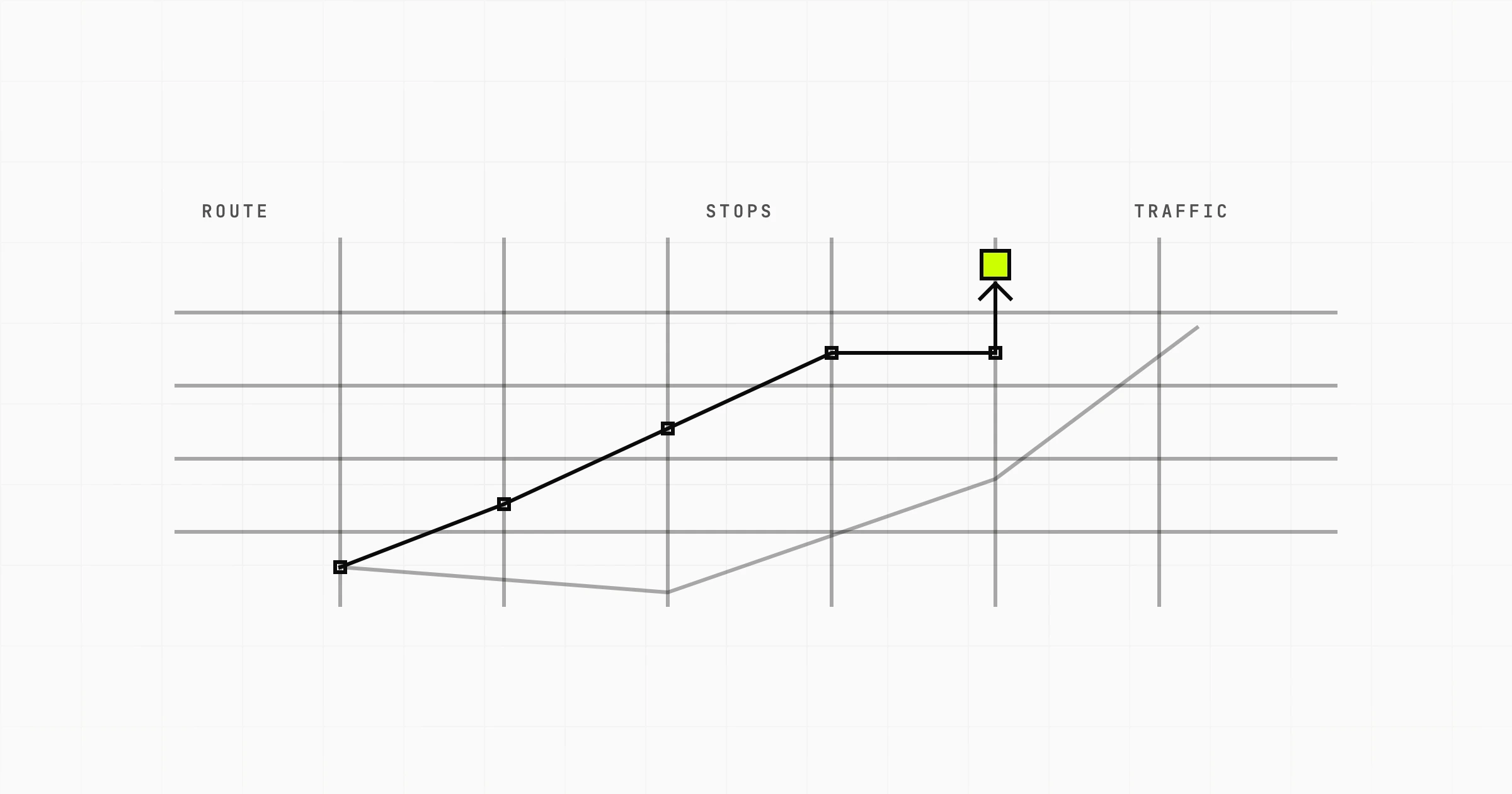
Static distance matrices quickly become outdated in real-world scenarios where traffic conditions fluctuate throughout the day. Integrating real-time traffic APIs transforms your route optimization from a theoretical exercise into a practical operational tool.
Popular traffic data providers include Google Maps Distance Matrix API, HERE Traffic API, TomTom Routing API, and OpenStreetMap-based services. Let's demonstrate integration with a generic traffic API structure:
import requests
import time

def get_real_time_distance_matrix(origins, destinations, api_key):
    """Fetch real-time distances from traffic API."""
    base_url = "https://maps.googleapis.com/maps/api/distancematrix/json"

    params = {
        'origins': '|'.join(origins),
        'destinations': '|'.join(destinations),
        'departure_time': 'now',
        'traffic_model': 'best_guess',
        'key': api_key
    }

    response = requests.get(base_url, params=params)
    data = response.json()

    # Extract distance matrix from response
    distance_matrix = []
    for row in data['rows']:
        row_distances = []
        for element in row['elements']:
            if element['status'] == 'OK':
                # Convert to meters
                distance_value = element['distance']['value']
                # Use duration_in_traffic for time-aware routing
                duration_in_traffic = element.get('duration_in_traffic', {}).get('value', 0)
                row_distances.append(distance_value)
            else:
                row_distances.append(0)  # Default for failed lookups
        distance_matrix.append(row_distances)

    return distance_matrix
This function queries the Google Maps API for real-time traffic data, which accounts for current traffic conditions and provides duration estimates based on historical patterns. The departure_time parameter set to 'now' ensures you receive current traffic-based estimates.
If you're piloting one corridor or fleet first, start from a published MVP cost breakdown before a multi-site rollout.
In production environments, you'll want to implement caching strategies to avoid repeated API calls for the same routes, as these services typically charge per request. Consider storing frequently-accessed route segments and refreshing them at appropriate intervals.
Creating a Complete Solution
Now let's combine all the components into a comprehensive solution that handles real-world scenarios including time windows, traffic, and multiple depots:
import datetime
from ortools.constraint_solver import routing_enums_pb2
from ortools.constraint_solver import pywrapcp

class DeliveryRouteOptimizer:
    def __init__(self, locations, demands, vehicle_capacity, time_windows=None):
        self.locations = locations
        self.demands = demands
        self.vehicle_capacity = vehicle_capacity
        self.time_windows = time_windows or {}
        self.num_vehicles = len(locations) // 3  # Rough heuristic
        self.depot = 0

    def optimize(self, traffic_data=None):
        """Execute the optimization with optional traffic data."""
        data = self._prepare_data(traffic_data)
        manager = pywrapcp.RoutingIndexManager(
            len(data['distance_matrix']),
            self.num_vehicles,
            self.depot
        )

        routing = pywrapcp.RoutingModel(manager)

        # Register callbacks
        transit_callback_index = routing.RegisterTransitCallback(
            lambda from_idx, to_idx: self._distance_callback(from_idx, to_idx, data)
        )

        routing.SetArcCostEvaluatorOfAllVehicles(transit_callback_index)

        # Add capacity constraint
        demand_callback_index = routing.RegisterUnaryTransitCallback(
            lambda idx: self._demand_callback(idx, data)
        )
        routing.AddDimensionWithVehicleCapacity(
            demand_callback_index, 0, self.vehicle_capacity, True, 'Capacity'
        )

        # Add time window constraints if specified
        if self.time_windows:
            time_callback_index = routing.RegisterUnaryTransitCallback(
                lambda idx: self._time_callback(idx, data)
            )
            routing.AddDimension(
                time_callback_index,
                30,  # allow 30 seconds of waiting
                300,  # maximum time (5 hours) per vehicle
                False,  # don't force start cumulatively at zero
                'Time'
            )

            for location_idx, (open_time, close_time) in self.time_windows.items():
                index = manager.NodeToIndex(location_idx)
                routing.SetCumulVarSoftLowerBound(index, open_time)
                routing.SetCumulVarSoftUpperBound(index, close_time)

        # Configure solver
        search_parameters = pywrapcp.DefaultRoutingSearchParameters()
        search_parameters.first_solution_strategy = (
            routing_enums_pb2.FirstSolutionStrategy.PATH_CHEAPEST_ARC)
        search_parameters.local_search_metaheuristic = (
            routing_enums_pb2.LocalSearchMetaheuristic.GUIDED_LOCAL_SEARCH)
        search_parameters.time_limit.seconds = 60

        solution = routing.SolveWithParameters(search_parameters)

        if solution:
            return self._extract_solution(manager, routing, solution)
        return None

    def _prepare_data(self, traffic_data):
        """Prepare data structure for the solver."""
        data = {
            'distance_matrix': traffic_data or self._calculate_static_distances(),
            'demands': self.demands,
            'num_vehicles': self.num_vehicles,
            'depot': self.depot
        }
        return data

    def _calculate_static_distances(self):
        """Calculate static distances as fallback."""
        # Simplified Euclidean distance calculation
        n = len(self.locations)
        matrix = [[0] * n for _ in range(n)]
        for i in range(n):
            for j in range(n):
                x1, y1 = self.locations[i]
                x2, y2 = self.locations[j]
                matrix[i][j] = int(((x2-x1)**2 + (y2-y1)**2)**0.5 * 1000)
        return matrix

    def _distance_callback(self, from_index, to_index, data):
        from_node = manager.IndexToNode(from_index)
        to_node = manager.IndexToNode(to_index)
        return data['distance_matrix'][from_node][to_node]

    def _demand_callback(self, from_index, data):
        from_node = manager.IndexToNode(from_index)
        return self.demands[from_node]

    def _time_callback(self, from_index, data):
        # Assume average speed of 30 km/h in city traffic
        return 1000  # placeholder travel time

    def _extract_solution(self, manager, routing, solution):
        """Extract route information from solution."""
        routes = []
        for vehicle_id in range(self.num_vehicles):
            index = routing.Start(vehicle_id)
            route = []
            while not routing.IsEnd(index):
                node = manager.IndexToNode(index)
                route.append(node)
                index = solution.Value(routing.NextVar(index))
            routes.append(route)
        return [r for r in routes if r]  # Filter empty routes
This comprehensive class encapsulates the entire optimization workflow, making it easy to integrate into larger logistics systems. It handles capacity constraints, time windows, and accepts traffic data for more accurate routing.
Best Practices and Implementation Considerations
Successfully deploying route optimization in production requires attention to several critical factors that go beyond the basic optimization algorithm.
First, consider the computational trade-offs between solution quality and computation time. While OR-Tools can find optimal solutions for smaller problems, larger real-world instances require heuristic approaches that find good solutions quickly. Always test with your actual data volumes to understand the performance characteristics.
Second, implement robust error handling for API failures. Network issues and API rate limits are inevitable in production systems. Build fallback mechanisms that use cached data or static distances when real-time data is unavailable.
Third, regularly update your distance matrices. Traffic patterns change based on time of day, day of week, seasons, and local events. Implement a caching strategy that balances freshness with API costs.
Finally, consider the human element. Driver preferences, vehicle characteristics, and local knowledge all impact route execution. Build flexibility into your model to accommodate these factors rather than treating drivers as interchangeable units.
Conclusion
Last-mile delivery route optimization represents a transformative opportunity for logistics companies seeking to reduce costs, improve delivery times, and enhance customer satisfaction. By combining Python's flexibility with Google OR-Tools' powerful optimization algorithms and real-time traffic data, businesses can build sophisticated routing systems that adapt to dynamic conditions.
The techniques and code examples provided in this guide offer a foundation for building production-ready solutions. From basic CVRP implementations to complex multi-constraint models with real-time traffic integration, the tools and approaches discussed here enable organizations to tackle the last-mile challenge systematically.
As e-commerce continues to grow and customer expectations evolve, route optimization will become increasingly critical for competitive success. Companies that invest in these technologies now will be better positioned to meet future demands while maintaining operational efficiency.
Whether you're building a new optimization system from scratch or enhancing existing logistics operations, the combination of Python, Google OR-Tools, and traffic APIs provides a powerful toolkit for solving one of supply chain management's most persistent challenges.
If you're serious about logistics software, a Scoping Sprint ($2,300, two weeks) gets you a prototype, technical plan and fixed quote — or contact us directly.