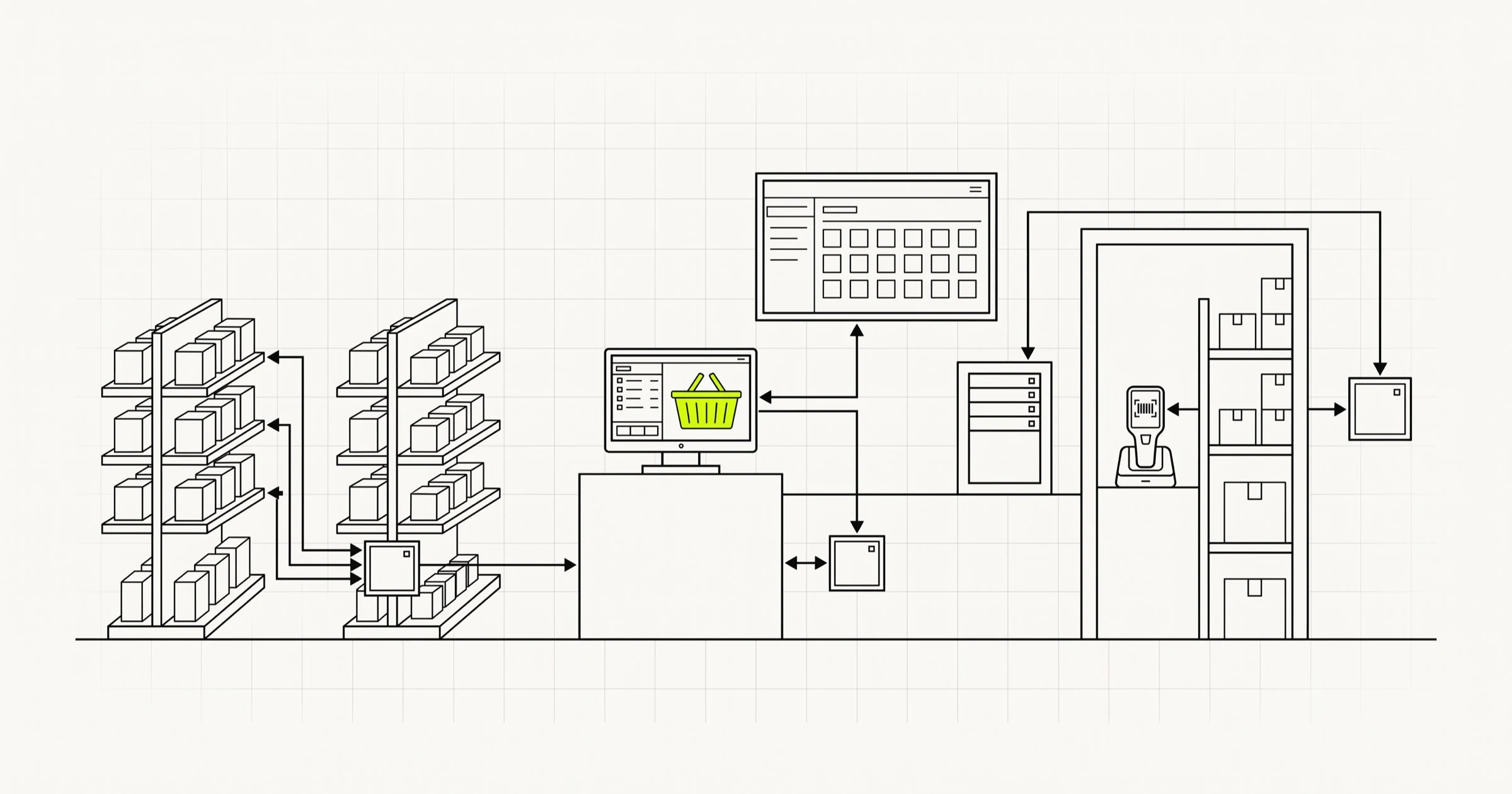
A retail software project is almost never one system. It is five or six of them that have to agree about what a product is, where the stock physically sits, and what it costs right now. The expensive part of the work is the agreeing, not the screens.
If you run a retail business and someone has quoted you for "a retail app", the first useful question is which of those systems the quote covers and which it quietly assumes already exists and already works. Most of the time the proposal is a storefront, and the storefront is the cheapest thing in the stack.
What follows is a working description of what building software for a retailer involves: the systems you end up running, how they connect, the one data problem sitting underneath all the others, what omnichannel actually costs in engineering terms, where machine learning genuinely pays in a store today, and how to sequence a rebuild while the tills keep ringing.
It is written for the operator or technology lead on the retailer's side: the person deciding what gets built, what gets bought, and what gets left alone until next year.
The six systems a retailer ends up running
Nobody sets out to run six systems. You open with a point of sale, add a website, then a second store, then a marketplace channel, then click and collect, and one morning you have six databases with an opinion about the same jumper.
The useful discipline is to decide, once and in writing, which system is the authority on each fact. Everything else holds a copy, and a copy may be stale but is never allowed to be edited.
| System | Authority on | What goes wrong when something else claims it |
|---|---|---|
| Point of sale | In-store transactions, tenders, till reconciliation | Sales land twice or never, and the day's cash does not balance |
| Product catalogue (PIM) | Product identity, attributes, images, category tree | The same item has three names and two barcodes across channels |
| Stock ledger | Quantity on hand, per location, per state | You oversell online and cancel the order by email |
| Ecommerce storefront | Online browsing, cart, checkout, content | Pricing rules get reimplemented in a theme and drift from the tills |
| Order management | Order state, allocation, fulfilment routing, returns | Nobody can answer "where is my order" without opening four tabs |
| Customer and loyalty | Identity, contact consent, points, purchase history | A customer is two records, and the one with the points is the wrong one |
Fulfilment sits alongside these: a warehouse system if you have a warehouse, a picking app if stores fulfil online orders, and a carrier integration either way. Bigger retailers split it out entirely into a warehouse system of its own, which is a sensible boundary as soon as more than one site ships goods.
The other number worth writing on the wall is the integration count. Connect every system directly to every other and you are maintaining n(n-1)/2 links: six systems means fifteen. Route everything through one integration layer and it is six. That layer does not need to be a product you buy. It needs to be a decision that all traffic goes through one place, with one retry policy, one log, and one person who understands it.
Inventory accuracy is the problem under every other problem
Every interesting retail feature is a promise about stock. Click and collect promises the item is in that store. Ship from store promises a staff member can find it in the next two hours. Low stock badges promise the number on the screen is real. If recorded stock and physical stock disagree, every one of those features becomes a way of disappointing a customer faster.
The disagreement is normal and it accumulates quietly. It does not need theft to appear.
- Goods received against the purchase order without anyone checking the carton contents.
- Returns put back on the shelf but never put back in the system, or the reverse.
- Damaged and expired stock written off on paper.
- Mis-scans at the till, where the operator scans one of two similar items twice.
- Items moved between stores informally because a colleague asked.
- Online orders picked but not yet confirmed, so the units are neither available nor gone.
- Offline tills that queue transactions and send them hours later, out of order.
Available to promise, not quantity on hand
The single most useful modelling change is to stop treating stock as one number. On hand is what the shelf holds. Available to promise is what you are willing to sell right now: on hand, minus reserved for picked orders, minus held for collection, minus a buffer per location, plus anything inbound that you trust enough to sell forward.
Once you write that as an explicit calculation in one service, you can tune it per channel. A store can hold back two units so the shop floor is never empty. A slow-moving line can be sold down to zero. A high-theft category can carry a larger buffer. Retailers who skip this step end up hard-coding a single global safety buffer, which is a blunt way of saying "we do not trust our own data" and which costs sales on every product that did not need it.
Cycle counts beat the annual stocktake
Counting everything once a year tells you the size of your problem long after it stopped being fixable. Counting a small slice continuously, weighted towards high value and fast moving lines, gives you a drift rate you can manage. In software terms: a counting task in the staff app, a variance report naming the location and the line, and a rule for when a variance triggers an investigation rather than a silent adjustment.
Treat accuracy as a metric with an owner. If you are building or replacing the stock layer, this is where dedicated inventory management software earns its keep, and it is worth getting right before anything downstream depends on it.
What omnichannel actually requires
Omnichannel is sold as a marketing idea. In engineering terms it is a specific list of promises, and each one has a cost. It helps to price them individually rather than approving the word.
- Buy online, collect in store. Needs per-location stock, a reservation that holds units for a defined window, a staff-facing pick and hold queue, a collection point handover with proof, and an expiry rule that returns unclaimed units to sale.
- Ship from store. Needs an order routing decision (which location fulfils, based on stock, distance, and how busy that store is), a picking app that works on a shop floor with patchy signal, packing materials at store level, and carrier label printing behind the counter.
- Return anywhere. Needs one order record both channels can read, a refund path that can credit a card the store never charged, and a rule for which location's stock the returned unit joins.
- One customer record. Needs identity resolution across an anonymous web session, a loyalty card, and an email address typed at a till, plus a consent record that travels with it.
- Endless aisle. Needs a store device that can sell stock the store does not hold, which means the store colleague is now placing an online order and the commission and reporting rules have to say so.
Notice how little of that is customer-facing. The visible part is a button on a product page; the work is a reservation model, a routing rule, a staff app and a returns policy expressed as code. When a retail build comes in over budget, this is usually where it went: the storefront was estimated and the back of house was not. If the online side itself is being rebuilt, the shape of that work is covered separately in our notes on ecommerce application development.
Integrate with the point of sale you have, do not replace it first
The instinct of most software teams meeting a retailer is to replace the point of sale, because it is old and the interface is ugly. Resist it for at least a year. The till is the most load-bearing component in the business and the ugliest parts of it are usually the parts doing real work: hardware drivers for scanners, scales, cash drawers and card terminals, an offline mode that keeps trading when the line drops, fiscal and tax compliance for each country you trade in, and a set of keyboard habits your staff perform several hundred times a day without looking.
Replacing that is a retraining project, a hardware project and a compliance project wearing a software project's clothes. Integrating with it is usually a month of careful work. Before committing either way, get concrete answers to these:
- Does it expose line-level sale events, or only end of day totals? Totals are enough for accounting and useless for stock.
- Can an external system post stock adjustments back in, or is the till the only writer?
- Is the interface push (webhooks, message queue) or pull (polling, nightly file)? A nightly file means your online availability is a day old.
- What happens to events created while a till was offline? They will arrive late and out of sequence, and your stock service has to accept a backdated event without corrupting the current figure.
- Is there a test environment, or does every integration test happen on a live till in a real shop?
- Who owns the product mapping between till codes and catalogue identifiers, and what happens when a new line is created at the till?
That last one causes more grief than it deserves to. Staff create products at the till under time pressure, and those records arrive in your catalogue with no images, no category, and a name like MISC BLUE 2. Decide up front whether the till may create products at all, and if it may, build the queue where someone tidies them.
Where AI actually earns its place in a retail stack today
Plenty of retail AI is theatre. A few applications are ordinary, well understood, and worth paying for. The honest split is between things that run on transaction data you already have, which tend to work, and things that require new sensors in physical space, which tend to be expensive and fragile.
Demand forecasting and replenishment
The strongest case. Forecasting per line, per location, per week, then turning that forecast into order quantities, is a bounded problem with a clear success measure: fewer stockouts at the same or lower stock holding. It needs sales history over at least a couple of full seasons, a record of when a line was actually out of stock (otherwise the model learns demand was zero), a promotions calendar and price change history. Retailers often discover here that nobody kept the promo calendar in machine-readable form. Fixing that is the project.
Personalization and merchandising
Ranking, recommendations, and category sort order on the storefront. Real, measurable with a holdout group, and the most common first AI project because the data is already in one place. The implementation detail matters more than the model choice, which is why it has its own piece on storefront personalization rather than a paragraph here.
Search that understands the query
Underrated. Retail search is full of queries a keyword index answers badly: "waterproof jacket for a toddler", a misspelled brand, a product described by its use rather than its name. Embedding-based retrieval alongside keyword matching, with the catalogue attributes as filters, is a contained project with an obvious before and after. It also produces the best personalization signal you own, because a typed query states intent outright.
Loss prevention and anomaly detection
Most of the value here is in transaction data, not cameras. Refunds without a matching sale, voids concentrated on one operator, discount codes used in patterns no customer would produce, negative stock adjustments clustered by location and time. This is anomaly detection over your own ledger, it runs overnight, and it produces a queue for a human to review. No new hardware.
Back office document work
Supplier invoices matched against purchase orders and receipts, messy supplier feeds normalised into your catalogue schema, first drafts of product copy across thousands of lines. Language models handle this well with a review step, because the cost of an error is a person catching it rather than a customer seeing it.
Where in-store computer vision is still hard
Shelf monitoring, checkout-free stores and camera-based behaviour analytics are real technologies that are genuinely hard to operate, and the software is the smaller half. Each store needs cameras mounted and calibrated, lighting that does not change the model's behaviour between morning and evening, a view that shoppers and stacked pallets do not block, network capacity to move video or a small computer in the ceiling to avoid moving it, and someone to call when a camera gets knocked. Add biometric and privacy law, which varies by country and is stricter than most sales decks imply, plus ongoing labelling as the range changes. Judge these on cost and reliability across the whole estate, not on accuracy in a pilot store.
Build versus buy, system by system
The default answer is buy, because retail has mature products in every category and none of them is where your business is different. The exception is any system encoding a rule your competitors do not have. Custom work belongs at the point of difference and nowhere else.
| System | Default | Reason | When building is defensible |
|---|---|---|---|
| Point of sale | Buy | Hardware, offline mode, fiscal compliance | An unusual selling model no product supports, such as service plus goods on one ticket |
| Accounting and payroll | Buy | Regulated, commoditised, audited | Never |
| Ecommerce storefront | Buy the platform, build the front end | Checkout and payments are solved; the experience is yours | A headless front end over a bought commerce engine is the common middle |
| Product catalogue | Buy if your range is standard | Workflow and validation are generic | Configurable, made to order, or heavily attributed ranges |
| Stock ledger and availability | Often build a thin service | Your reservation and buffer rules are specific to your operation | Usually. This is where custom rules actually live |
| Order management | Buy, then extend | Order state machines are well trodden | Routing logic that reflects an unusual estate or delivery promise |
| Store staff apps | Build | They encode how your shops actually work | Almost always, and they are small |
| Integration layer | Build or assemble | Nobody sells a connector for your exact combination | Always yours to own, even if it uses bought pieces |
Budget for the fact that this stack does not sit still. From operating Denti360, our own multi-branch clinic SaaS, the planning number we publish is ongoing engineering of 15 to 20 percent of the original build cost per year to keep a system current, before any new features. A retail stack with more third-party interfaces will not be cheaper. If a proposal shows a build cost and nothing after it, add that line yourself. Order-of-magnitude figures for the storefront side sit in our ecommerce build cost guide.
A sequence that does not stop trading
Retailers cannot take a quarter off to replatform. This sequence is ordered so each phase is useful on its own and nothing waits on a distant big bang.
- Measure stock accuracy before deciding anything. Count a representative sample across a few stores and compare with the system. The variance you find sets the ambition for everything else. If it is bad, the first project is not a storefront.
- Fix product identity. One identifier per sellable unit, one catalogue that owns names, attributes and images, and a rule about who may create a product. Every later integration is easier because of this, and every later integration is harder without it.
- Stand up the stock service and feed it from the till. One place that answers "how many, where, and how many can I sell". Read from it in one low-risk channel first while the old path stays live.
- Put the integration layer in before the third integration, not after the fifth. The cost of retrofitting it rises with every point-to-point link you have to unpick.
- Rebuild the storefront against the new services. By this point it is reading real availability, which is what makes it worth rebuilding.
- Add omnichannel promises one at a time. Click and collect in a handful of stores, measured, before it goes on every product page across the estate.
- Then the AI layer. Forecasting, search and ranking all sit on the clean data the earlier phases produced. Attempting them first is why so many retail AI pilots quietly end.
Three operational rules go around that sequence. Freeze changes through peak trading, and define peak generously. Run old and new in parallel with a daily reconciliation report rather than cutting over on faith. And pilot in stores, not in a meeting: one store, one region, then the estate.
One structural decision is worth making on day one because retrofitting it hurts. If you have more than one location, or might have, put the location identifier in the schema from the first migration: on stock, on orders, on prices, on permissions. We did exactly this with branch scoping in Denti360, and the retail equivalent is the same shape. Teams that add a store column later spend months hunting the queries that forgot it.
Smart store technology, grounded
The in-store technology worth attention is mostly unglamorous, and it is worth separating by how proven it is.
Working now, in ordinary shops. Handheld scanners and staff apps for counting, receiving and picking. Electronic shelf labels, which matter because price changes and promotions get pushed from one system instead of printed and walked around the shop. RFID at item level, the one in-store technology with a direct line to the accuracy problem, because it makes counting cheap enough to do weekly instead of annually and cheap counting is what closes the drift. Self checkout, a well understood product with well understood loss and staffing trade-offs. Mobile payment acceptance, so a colleague can take payment anywhere on the floor.
Real but capital-intensive. Camera-based checkout-free stores, shelf-scanning robots, automated micro-fulfilment. These work in the sense that they exist and operate. They are property and hardware programmes with a software component, priced per store, with installation lead times and maintenance contracts. They are evaluated by finance, not by an engineering team, and the software vendor's demo is the least informative part of the decision.
Usually theatre. Interactive mirrors and in-store screens nobody staffs or updates. Store apps that duplicate the website but worse. Anything whose business case is "customers will find it interesting". Two questions settle it: does it move a number the store manager is measured on, and who maintains it in month seven?
Choose by constraint. If stock accuracy is the binding constraint, RFID and a counting workflow beat every customer-facing gadget. If queueing is the constraint, more payment acceptance beats a screen. The broader shape of this work across stores and online sits in our retail and ecommerce development practice.
Trying to work out which retail system to fix first, and what it would cost to connect the point of sale, the stock and the storefront you already run? A Scoping Sprint ($2,300, two weeks) ends with an integration map and phased plan for your estate, a clickable prototype of the first piece, and a fixed quote for the build. Or just start a conversation.